


Since February 2026, a sophisticated malware campaign has been quietly infiltrating Windows computers across the globe, using an unexpected and deceptively simple attack vector: the humble USB drive. Microsoft Threat Intelligence has codenamed the threat CryptoBandits, formally tracked as Trojan:Win32/CryptoBandits, and its capabilities are alarming enough to have prompted a rare public security advisory. This is not a theoretical exploit. It is a live, active, self-propagating campaign that has been stealing cryptocurrency wallet credentials for over four months, and security researchers believe the actual spread could be far larger than current detection numbers suggest.
🔑 Key Takeaways
- CryptoBandits is a crypto-clipper malware that spreads via infected USB drives.
- It intercepts wallet addresses and private keys from the clipboard.
- Uses Tor for C2 communication, making detection difficult.
- Includes remote code execution capability, turning the stealer into a backdoor.
- Microsoft recommends disabling AutoRun and verifying addresses character by character.
Understanding the Threat: What is a Crypto Clipper?
Before diving into the specifics of the CryptoBandits campaign, it is important to understand the broader category of malware it belongs to. A crypto clipper is a type of malware that silently monitors a user’s clipboard — the temporary buffer where copied data is stored — and intercepts sensitive information that passes through it. In the context of cryptocurrency, this means wallet addresses, seed phrases, and private keys.
The concept of clipper malware is not new. Versions targeting Android devices have appeared on Google Play, and cybersecurity firm ESET documented Android/Clipper.C as early as 2019, a malware that replaced Bitcoin or Ethereum wallet addresses copied to the clipboard with attacker-controlled addresses. However, the CryptoBandits campaign represents a significant leap in sophistication, combining worm-like USB propagation, Tor-based anonymized command-and-control, and remote code execution capabilities into a single unified threat.
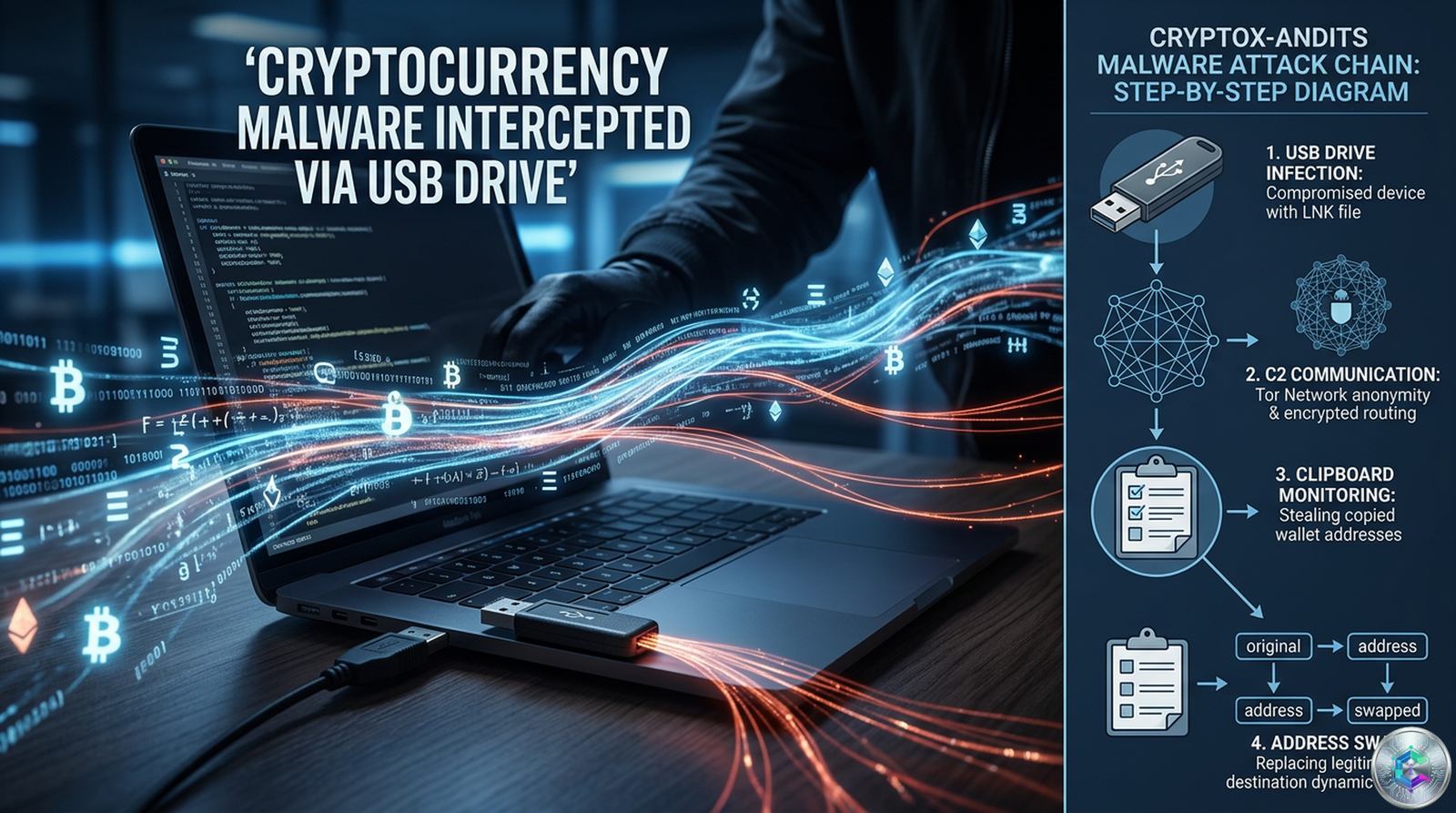
As Microsoft put it in its June 17, 2026 security analysis: « The threat goes beyond traditional crypto-clippers, functioning as both a cryptocurrency stealer and a lightweight backdoor. »
Infection Chain: How It Gets Onto Your Computer
The CryptoBandits campaign begins with a remarkably low-tech vector: a malicious Windows shortcut file, known as a .lnk file, distributed via USB storage devices. This attack chain is deliberately designed to exploit human behavior and the widespread habit of sharing USB drives between computers.
Phase 1: The Initial USB Infection
The victim receives or finds a USB drive containing what appears to be ordinary documents — Word files, Excel spreadsheets, or PDFs. The files look completely normal. However, each of these files has been hidden by the malware, and in its place, a malicious .lnk shortcut file has been created, bearing the exact same filename. When the user double-clicks what they believe is their document, they are actually launching the malware.
According to Microsoft’s analysis, the infection process checks whether the machine is already infected before proceeding. If the malware detects a prior infection, it exits silently. This is an anti-duplication mechanism that prevents the malware from wasting resources on already-compromised systems, while also making forensic analysis more difficult.
Phase 2: Worm Staging and Payload Deployment
Once the .lnk file is triggered, the malware stages additional payloads. It creates folders in C:\Users\Public\Documents\ under randomly generated five-character directory names, dropping two JavaScript files into each. The malware uses multi-layered obfuscation, combining PyArmor and PyInstaller packaging for the installer component with dual-layer JavaScript obfuscation for the runtime payloads.
The malware then establishes persistence by creating two indefinite scheduled tasks — one for the USB worm propagation component and one for the stealer activity. This dual-scheduled-task approach ensures the malware survives system reboots and continues operating even after partial remediation attempts.
Phase 3: Tor Client Deployment
The malware deploys a bundled, renamed Tor executable (ugate.exe) in a hidden window. It establishes a SOCKS5 proxy connection through localhost:9050, which allows all subsequent network traffic to be routed anonymously through the Tor network. This is a critical design choice: by using Tor instead of traditional IP-based command-and-control infrastructure, the attackers dramatically reduce the risk of their C2 servers being traced, shut down, or blocked.
« Instead, it deploys a portable Tor client, routes traffic through a local SOCKS5 proxy, and blends data theft with remote code execution, turning a financially motivated stealer into a lightweight backdoor. »
The Hacker News
The Self-Propagating Worm: How It Spreads
One of the most dangerous aspects of the CryptoBandits malware is its worm-like ability to spread through USB devices. Unlike a traditional virus that requires a user to download or install something, this malware moves autonomously through removable media, infecting clean machines without the attacker lifting a finger.
The worm component operates as follows: a scheduled task continuously monitors for newly connected USB storage devices. When a clean USB drive is inserted, the malware scans it for document files (.doc, .xlsx, .pdf). It then hides the original documents and replaces them with malicious .lnk shortcuts bearing identical filenames. The malware also copies its staging files to the USB drive.
This creates a self-perpetuating cycle. The USB drive travels to another computer, someone clicks what looks like a document shortcut, and the infection repeats. The worm does not require any action from the original attacker after the initial deployment. It spreads organically through the physical sharing of USB drives — a threat vector that corporate security policies often overlook.
As BleepingComputer reported: « When users attempt to open documents, the malware executes. » The social engineering element is subtle but highly effective: users trust file shortcuts that appear to be documents they placed on the drive themselves.
The Clipper Component: What It Steals and How
Once the stealer component is active — and it waits silently until Task Manager is not running to avoid detection — the malware enters a continuous monitoring loop. It uses Windows Script Host (WScript) and ActiveX-driven logic to interact with the operating system at a deep level.
Clipboard Monitoring (Every 500 Milliseconds)
The stealer checks the clipboard every 500 milliseconds for cryptocurrency-related data. This extremely high polling frequency means that virtually no clipboard event goes unexamined. The malware targets a comprehensive list of cryptocurrency credentials:
- 12-word BIP39 seed phrases (the standard recovery phrase format for most hardware and software wallets)
- 24-word BIP39 seed phrases (used by some wallets for additional security)
- Ethereum private keys
- Bitcoin WIF (Wallet Import Format) keys
- Bitcoin wallet addresses across all major formats: Legacy (starting with 1), P2SH (starting with 3), Bech32 (starting with bc1q), and Taproot (starting with bc1p)
- Tron (TRX) wallet addresses (starting with T)
- Monero wallet addresses
The sophistication of the address replacement logic is particularly noteworthy. Rather than replacing a copied address with a random string, the malware substitutes it with an attacker-controlled address that shares structural similarities — matching the first two characters for Legacy and P2SH addresses, or matching the last character for Bech32 and Taproot addresses — to reduce the likelihood of the victim noticing a mismatch in character length or format.
Seed Phrase and Private Key Exfiltration
When the malware detects a seed phrase on the clipboard, it saves it locally and attempts to transmit it to the command-and-control server via Tor. It retries transmission until an acknowledgment is received, and only deletes the local copy after confirmed delivery. The same applies to private keys. This retry-until-acknowledge mechanism is a deliberate design choice that ensures critical data is exfiltrated even in unstable network conditions.
Screenshot Surveillance
The malware also takes screenshots. Every 10 seconds, it captures five screenshots of the infected machine’s display. These screenshots are exfiltrated to the attacker through the Tor network using the curl tool. The purpose of the screenshots is contextual: they allow the attacker to see what the victim was doing at the time the clipboard data was captured — for example, confirming that the user was about to execute a cryptocurrency transaction on a specific platform.
Remote Code Execution
Perhaps the most alarming capability is the EVAL command, which allows the attacker to execute arbitrary JavaScript code on the infected machine remotely. When the command-and-control server returns an EVAL instruction, the malware downloads JavaScript content to a file named « cfile » and executes it. This effectively transforms the malware from a cryptocurrency stealer into a general-purpose backdoor, giving the attacker the ability to run any code they choose on the compromised system.
Command-and-Control Infrastructure
The CryptoBandits campaign uses a Tor-based command-and-control architecture that represents a significant evolution from earlier, simpler crypto-clipper malware. The infrastructure consists of three main endpoints on hidden .onion services:
– /route.php — Used for beaconing and command retrieval
– /recvf.php — Used for file uploads, including screenshots
– /stub.php — Used for payload downloads
When the Tor connection initializes, the malware generates a unique victim identifier (a GUID) and registers the infected device with the external server. Each subsequent beacon includes this GUID along with geolocation data, allowing the attacker to track and manage a global fleet of compromised machines.
The use of Tor hidden services means that the C2 infrastructure is extraordinarily difficult to disrupt through traditional takedown methods. Even if law enforcement agencies manage to identify and seize a C2 server, the decentralized nature of Tor means the attackers can simply spin up a new hidden service with a new .onion address, update the malware configuration through the same encrypted channel, and continue operations.
« By bundling its own Tor client and communicating exclusively through hidden .onion services, the malware conceals its infrastructure while maintaining persistent access to infected devices. »
CyberInsider
Risk Assessment
The highest-risk users are Windows users who have plugged an unknown or shared USB drive into a computer that also handles cryptocurrency transactions. This includes:
- Individual cryptocurrency holders who occasionally share files via USB
- Office workers who use USB drives to transfer documents between home and work computers, one of which may be used for cryptocurrency management
- Businesses that handle cryptocurrency payments and share files with external parties via removable media
- Anyone who has used a USB drive from a third party on a computer connected to a cryptocurrency wallet
It is worth emphasizing that the malware does not need to be on the same machine as the wallet application to pose a threat. If the malware is running on a computer that you use to access cryptocurrency platforms, copy wallet addresses, or manage seed phrases, those credentials can be captured regardless of where the actual wallet software is installed.
As TechJack Solutions noted in its analysis: « This threat only affects you if you plug in an infected USB drive on a Windows computer. If you do not use cryptocurrency, your main risk is someone gaining access to your computer, which is serious but requires you to first use an infected USB drive. »
Microsoft’s Recommended Mitigations
Microsoft’s security team has published a comprehensive set of detection and prevention recommendations for the CryptoBandits campaign. These are not theoretical safeguards — they are practical, implementable controls that organizations and individuals can deploy immediately.
Disable AutoRun and AutoPlay for Removable Media
The simplest and most effective first step is to disable the AutoRun and AutoPlay features for USB drives and other removable media. This prevents malicious code from executing automatically when a USB device is connected. On Windows, this can be configured through Group Policy or the Settings application.
Block LNK Execution from USB Drives
Organizations with advanced security configurations can use Group Policy to block the execution of .lnk (shortcut) files originating from removable drives. While this may cause some inconvenience in environments where USB file sharing is common, it eliminates the primary infection vector for this campaign.
Restrict Windows Script Host
The malware relies heavily on Windows Script Host (wscript.exe and cscript.exe) for its core functionality. Restricting or monitoring the use of these interpreters can significantly reduce the malware’s ability to operate. Application control policies can be used to block wscript.exe and cscript.exe from launching unless explicitly required by a legitimate application.
Monitor for Tor Proxy Activity on Port 9050
One of the strongest behavioral indicators of a CryptoBandits infection is a local Tor proxy listening on port 9050. Microsoft recommends monitoring endpoints for this specific network activity. If a connection to localhost:9050 is detected on a machine that does not have an intentionally installed Tor client, this should be treated as a high-priority security incident.
Behavioral Detection Over Static Signatures
Because the malware uses multi-layered obfuscation and runtime decryption, traditional signature-based antivirus solutions may struggle to detect it. Microsoft recommends prioritizing behavioral detection — watching for unusual process behavior, unexpected script launches, and anomalous network activity — over static file scanning.
Regular Antivirus Scans and Updates
Keeping Microsoft Defender or another reputable antivirus solution up to date and running regular full-system scans can help detect CryptoBandits variants. Microsoft Defender for Endpoint will flag detections named Trojan:Win32/CryptoBandits.A, Trojan:Win32/CryptoBandits.B, Trojan:JS/CryptoBandits.A, or Trojan:JS/CryptoBandits.B.
Best Practices for Cryptocurrency Users
Beyond organizational security controls, individual cryptocurrency users should adopt a set of strict operational security habits to protect against this and similar threats.
Never Connect Unknown USB Drives to Crypto Computers
This is the single most important precaution. If you handle cryptocurrency on a computer, that machine should never have a USB drive connected to it unless you are absolutely certain of its provenance. Be especially wary of USB drives received at conferences, from colleagues, or found in public places.
Verify Every Wallet Address Character by Character
The address replacement attack is designed to be invisible. The address displayed in your clipboard after copying may appear correct, but the malware has silently substituted the attacker’s address in the fraction of a second between your copy and paste operations. Before executing any cryptocurrency transaction, always verify the full address character by character against a known-good source. Do not rely solely on the first and last few characters, as the malware is designed to preserve those.
Use a Hardware Wallet for Significant Holdings
Hardware wallets store private keys in a secure, isolated environment that is immune to clipboard-monitoring malware. Even if your computer is completely compromised, a hardware wallet that requires physical button presses to confirm transactions cannot be drained remotely. For significant cryptocurrency holdings, this is not optional — it is essential.
Isolate Crypto-Activity Computers from USB Sharing
Dedicate a specific computer to cryptocurrency activities that is never used for general file handling, USB drive connections, or email attachments. This machine should have no removable media access, restricted internet browsing, and strict application controls.
The Bigger Picture and Perspectives
The CryptoBandits campaign is not just another piece of malware. It represents a convergence of several concerning trends in the cybersecurity landscape that have been building for years.
First, the use of physical media (USB drives) as a primary infection vector is a throwback to the earliest days of computer viruses, and it is deliberately chosen because modern security defenses focus almost exclusively on network-based threats. Enterprise security stacks are optimized for email filtering, web browsing protection, and network intrusion detection. USB drives often pass through these defenses unexamined, especially when they are used in air-gapped or semi-air-gapped environments.
Second, the Tor-based command-and-control infrastructure sets a new bar for operational security in financially motivated malware. Traditional malware campaigns often use dedicated IP addresses or domains for C2, which can be traced, blocked, or seized. By routing all C2 traffic exclusively through Tor hidden services, the CryptoBandits operators have made their infrastructure extraordinarily resilient to takedown efforts.
Third, the addition of remote code execution through the EVAL command means this is no longer just a cryptocurrency theft tool. It is a fully capable backdoor that gives the attacker a persistent presence on the infected machine, the ability to install additional malware, pivot to other systems on the same network, and conduct espionage or sabotage as desired.
As Microsoft noted: « The execution of this clipper is notable because it does not depend on a traditional installer or exposed IP-based C2 infrastructure. Instead, it deploys a portable Tor client, routes traffic through a local SOCKS5 proxy, and blends data theft with remote code execution, turning a financially motivated stealer into a lightweight backdoor. »
The CryptoBandits campaign is a sobering reminder that some of the most dangerous threats in the cryptocurrency ecosystem do not come from exchange hacks or smart contract exploits — they come from old-fashioned, human-dependent attack vectors that exploit trust, convenience, and the assumption that « it won’t happen to me. »
The malware’s ability to spread silently through USB drives, hide its network traffic inside Tor, steal seed phrases and private keys from the clipboard, replace wallet addresses at the moment of transaction, and execute arbitrary remote code makes it one of the most comprehensive and dangerous cryptocurrency-targeting threats documented in recent years.
The good news is that this threat is not unbeatable. Basic cybersecurity hygiene — not plugging unknown USB drives, verifying wallet addresses character by character, using hardware wallets, keeping software updated, and monitoring for the behavioral indicators Microsoft has published — can provide strong protection against this and similar campaigns.
The four-month head start that CryptoBandits has already gotten is a reminder that when it comes to cybersecurity, waiting for an alert to become a crisis is already too late.
Sources
- Microsoft Security Blog – Crypto Clipper uses Tor and worm-like propagation for persistence and control (June 17, 2026)
- The Hacker News – Microsoft Details Windows Clipper Malware Campaign Using USB LNK Worm and Tor-Based C2 (June 18, 2026)
- BleepingComputer – USB worm spreads crypto-stealing malware via Windows shortcut files
- CyberInsider – Microsoft warns of USB worm-like malware using Tor for stealth
- GridInSoft – Trojan:Win32/CryptoBandits.A USB Clipper Warning
- CoinAcademy – Malware crypto : Microsoft alerte sur un virus via USB
This article is published for informational and educational purposes only. It does not constitute investment advice. Do your own research (DYOR) before making any decisions.

